Keep an eye on the apartment from afar, without cameras in the rooms: by the doors, the plugs and the air conditioners
A sensor on the front door, power measurement on one appliance and the state of the air conditioner show whether anyone is in the apartment, without photographing the guests. Transparency towards the guests is part of the decision.
- Level
- Intermediate
- Active time
- 45–90 minutes
- Home Assistant required
- Yes
You want to know whether the apartment is empty between guests, whether the door is locked and whether the air conditioner is running for nobody. You don’t want a camera in the rooms: it is too much of an intrusion into personal space and in many cases not permitted. That is why we monitor by traces, not by image.
What you will get
A dashboard and notifications for: the front door opening, the use of an appliance (the plug’s power) and the air conditioner’s state. From them you can see whether someone is at home. You can’t see who it is or what they are doing.
Boundary: the decision is yours as the owner.
What we need
- 1 pc Sonoff SNZB-04PR1: a Zigbee 3.0 door sensor, CR2477 battery.
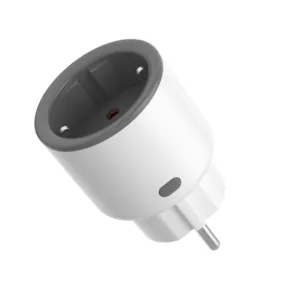
- 1 pc Sonoff S60ZBTPF: a Zigbee plug up to 16 A with power measurement. Plug into it a lamp or a light appliance, such as a lamp by the entrance or a TV, following Sonoff’s instructions.
- An air conditioner added to Home Assistant as a
climateentity. - A working Home Assistant and a phone with the Home Assistant app.
You need a Zigbee hub or Home Assistant with a Zigbee adapter.
How it works
- Door:
binary_sensorisonwhen the door is open. The number of openings and the last time give a log. - Plug: the power of a lamp or TV above zero means the appliance is in use.
- Air conditioner: the entity
climateshows the mode and the set temperature.
Gathering them in one view answers the question “is anyone inside”, without a camera.
At Simeon’s apartment the air conditioners connect through MELCloud Home (the cloud) and show the current temperature and the monthly consumption.
Steps
- Place the sensor on the front door. Pair it.
- Plug the plug between the appliance and the wall and add it in Home Assistant. You expect a power sensor in W.
- Make a dashboard view with the door, the power and the air conditioner.
- Optional: a notification on opening, when the apartment should be empty. Example code:
alias: Door open in an empty apartment
mode: single
triggers:
  - trigger: state
    entity_id: binary_sensor.door_front
    to: "on"
conditions:
  - condition: state
    entity_id: input_boolean.apartment_expected_empty
    state: "on"
actions:
  - action: notify.mobile_app_your_phone
    data:
      title: Front door
      message: The door is open, and the apartment should be empty.
input_boolean.apartment_expected_empty is a helper that you switch on between stays. It is an example.
Privacy and transparency
- Tell the guests in the listing and at check-in what sensors there are. Don’t hide anything.
- The rules of the rental platform and local personal data legislation apply. We don’t give legal advice.
- Keep the history only as long as you need it.
Checking the result
- Open and close the door: the dashboard shows the event.
- Switch on the lamp in the plug: the power changes.
- Check the notification by switching on the “empty” helper and opening the door.
If it doesn’t work
- The door shows the opposite state → the magnet is on the wrong side → move it.
- The plug isn’t visible → the Zigbee connection or the integration → check.
- Notifications during the day → the helper isn’t switched off → switch it off at check-in.
Limitations
- Power is an indirect sign: a lamp being on doesn’t mean a person.
- There is no answer to who is inside and how many.
- We monitor only the front door and chosen appliances. Other entrances are not visible.
Sources and verification status
Checked against the documentation on 22.11.2026.
Need a hand?
We can set up and install everything in this project. In some regions we install it ourselves — ask us.
Contact us